

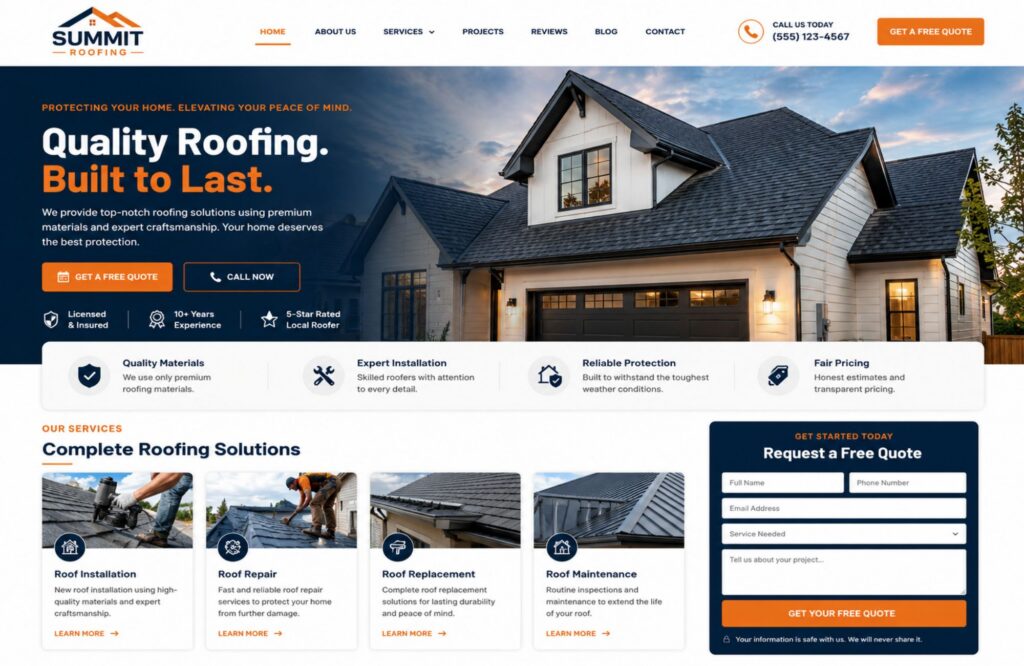
Web design for roofers should turn storm traffic into calls, inspection requests, and qualified leads without slowing homeowners down. A strong roofing website loads fast, explains where the company works, shows proof of licensing and past roofing projects, and gives visitors a simple way to request help from any mobile device.
In this guide, you will learn how to plan storm landing pages, quote forms, local SEO, trust signals, lead routing, performance checks, and legal safeguards. You will also see a practical storm-response workflow that helps a roofing company handle more leads without making promises it cannot keep.
Why Does Web Design for Roofers Need a Storm-Season Plan?
Web design for roofers needs a storm-season plan because demand can rise across several towns within hours. Homeowners may search for emergency roof repair, hail damage inspections, missing shingles, roof leaks, or a full roof replacement while crews and office staff are already under pressure. The website must collect useful details and set clear expectations.
Storm season is not one fixed national period. NOAA’s National Severe Storms Laboratory states that peak tornado activity often reaches the southern Plains from May into early June, the Gulf Coast earlier in spring, and the northern Plains or Upper Midwest in June or July. Severe thunderstorms can happen outside those windows. The National Weather Service classifies a thunderstorm as severe when it produces hail at least one inch in diameter, wind gusts of 58 mph or greater, or a tornado.
That regional pattern changes how roofing website content should be planned. A Texas roofing business may prepare spring hail pages months before a Connecticut roofing company expects its main summer demand. The site should use the service area, weather history, roofing services offered, crew capacity, and after-hours process as planning inputs.
A documented event from May 15 through May 18, 2026, shows why this matters. The National Weather Service reported several rounds of severe weather across eastern Nebraska and southwest Iowa, including three tornadoes on May 17 and six more on May 18. A one-day campaign would not have matched a multi-day event that affected several locations.
A storm-ready roofing site needs more than a banner that says “storm damage.” It needs stable service pages, location-specific pages with useful local details, an emergency contact path, and a clear way to sort urgent repairs from routine estimates.
What Should a Storm-Ready Roofing Website Include?
A storm-ready roofing website should help prospective customers answer five questions fast: Do you handle this damage? Do you serve my location? Can I trust you? How soon can you respond, and what should I do next? The best roofing website design places those answers near the top of each key page.
The homepage should state the main roofing services and service area without vague claims. A useful first screen may include “Storm Damage Roof Inspections in [Region],” a tap-to-call button, an inspection request button, business hours, and an honest response note. Do not post “same-day service” unless the roofing business can support it during peak demand.
The core site structure should include:
| Page or Feature | What It Should Contain | Business Result |
| Homepage | Main services, service area, trust proof, phone number, primary CTA | Creates a clear first impression |
| Roof repair page | Leak, hail, wind, flashing, shingle, and emergency repair details | Matches urgent search intent |
| Roof replacement page | Materials, process, warranties, financing, inspection steps | Supports larger new roof projects |
| Storm damage page | Damage types, safety steps, inspection request, insurance disclaimer | Captures storm-specific leads |
| Location-specific pages | Unique service details, local projects, service limits, local proof | Supports local search results |
| Project gallery | Real roofing projects, materials, city, scope, before-and-after photos | Builds the company’s credibility |
| Contact page | Phone, form, hours, response process, privacy notice | Reduces contact friction |
A custom website also needs a clear header, readable type, responsive design, working forms, and mobile responsiveness. Google uses the mobile version of a site for indexing and ranking, so hidden mobile content or a poorly designed mobile layout can weaken search visibility.
Treat the roofing company website as an active sales system, not a digital business card. A basic website builder may handle a simple brochure site, but a storm-ready custom website often needs conditional forms, CRM routing, load testing, structured data, and location-specific publishing controls. Each page should move potential customers toward a call, inspection request, or qualified quote.
How Should Web Design for Roofers Capture Emergency Leads?
Web design for roofers should give urgent visitors one obvious action while keeping a second option for people who cannot call. A sticky phone button handles immediate roof leaks and exposed areas. A short storm form captures after-hours requests, photo evidence, addresses, and damage details for the next available team member.
The main call button should stay visible on mobile devices, but the wording must match the roofing company’s real schedule. Use “Call for Storm-Damage Availability” when crews may be full. Use “24/7 Emergency Line” only when a person or answering service can respond at all hours. This small wording choice protects trust and prevents frustrated callers.
The form should separate urgent and non-urgent needs. A homeowner with active water entering the home should not enter the same queue as someone planning a roof replacement next month. Add a first question such as:
- Active leak or exposed roof
- Hail or wind damage with no active leak
- Insurance inspection request
- Planned roof repair
- Planned roof replacement
- Commercial roofing request
After submission, show a confirmation page that states what happens next. It should repeat the business phone number, explain the expected response window, and tell the homeowner to contact emergency services when there is immediate danger. The website should never act like a public safety service.
A strong roofing site also keeps the emergency action easy to use with a keyboard, readable labels, visible focus states, sufficient text contrast, and error messages that explain how to fix a field. The U.S. Department of Justice states that the ADA applies to businesses open to the public and that their web content must be accessible. WCAG provides widely used technical guidance, but the applicable legal standard and conformance level can depend on the organization and jurisdiction.
The goal is not to collect every possible detail. It is to capture enough information for safe triage and a fast callback.
What Should a Roofing Quote Form Ask?
A roofing quote form should ask only for details that help the team route, qualify, and respond to the request. Long forms reduce speed during stressful searches, while forms that ask too little create extra calls and poor scheduling. A short first step, followed by conditional questions, gives both sides a better experience.
Use these fields for most storm-season inquiries:
- Name
- Mobile phone number
- Email address
- Property address or ZIP code
- Residential or commercial property
- Service needed
- Active leak or exposed roof status
- Date or time the damage was noticed
- Short damage description
- Optional photo upload
- Preferred contact method
- Consent checkbox when marketing texts or automated calls may follow
Not every field should be required. Photo uploads help roofing contractors judge visible damage, but large files can fail on weak mobile connections. Allow several common image formats, compress uploads, show file limits, and keep a phone option visible.
The form should not ask homeowners to diagnose hidden damage or state that an insurance claim will be approved. Use wording such as “Tell us what you can see” and “We can document visible conditions during an inspection.” A contractor should describe roofing work, not act as the insurance carrier.
Commercial text follow-up needs added care. The FCC states that commercial texts require written consent, so the form should use clear consent language when automated marketing messages are part of the follow-up process. A service reply to a person’s direct request is different from an ongoing promotional campaign, and legal review is wise when the workflow mixes both.
Send form data to one controlled system, such as the roofing company’s CRM, field service platform, or monitored inbox. A form that sends leads to an unattended email address is not a lead-generation machine.
How Does Web Design for Roofers Support Local SEO?
Web design for roofers supports local SEO when the site gives search engines and local customers clear information about services, service areas, business identity, and proof of work. Dedicated roofing service pages and useful location-specific pages can match searches such as “hail damage roofer in [city]” without copying the same text across dozens of towns.
Each core service needs its own page when the search intent and sales process differ. Roof repair, roof replacement, storm damage inspections, commercial roofing, metal roofing, and emergency tarping should not sit inside one thin list. A focused service page can explain who the service is for, common warning signs, materials, process, service area, project examples, and the next step.
Location-specific pages should add real local value. Include projects from the area, common roof types, local service limits, nearby landmarks only when useful, customer testimonials tied to the location, and a clear explanation of the roofing services offered there. Avoid changing only the city name across many pages. Repeated city-swap pages create a poor user experience and give search engines little reason to treat each location page as distinct. Build each page around genuinely local services, projects, proof, and limitations instead.
The roofing website should also connect with a complete Google Business Profile. Business name, phone number, website, hours, and service details should stay consistent. LocalBusiness structured data can give Google explicit details about business hours and other company information, but the markup must match the content visible on the page. Google does not promise a rich result just because structured data is present.
For a deeper service-area plan, connect the site structure with WebHaus’s Local SEO playbook for service-area businesses. Local SEO works best when the roofing site, Google Business Profile, service pages, location pages, reviews, and real projects support the same business facts.
What Trust Signals Help a Roofing Company Win Storm Leads?
A roofing company wins storm leads when its website proves that the business is real, qualified, local, and clear about its process. Homeowners face pressure after hail, wind, or tornado damage. Visible license details, insurance proof, roofing industry certifications, written warranties, real project photos, and honest customer testimonials reduce doubt.
Storm pages should show trust proof close to the call button or form, not buried in the footer. Useful trust signals include:
- Legal business name
- Current contractor license number when the state or local area requires one
- Proof of general liability and workers’ compensation coverage
- Manufacturer certifications that are current and correctly named
- Memberships such as NRCA or local trade groups, when active
- Real team, truck, and roofing project photos
- Reviews from real customers
- Written workmanship and manufacturer warranty details
- Financing terms or a clear link to the financing provider
- Service area and business address details
After a disaster, trust has added weight. The FTC warns that unlicensed contractors and scammers often appear in recovery areas. It tells homeowners to confirm licenses and insurance, get written estimates, and avoid contractors who demand full payment upfront or ask people to sign over an insurance check.
The website should make those checks easy. Link a license number to the state lookup page when possible. State whether a warranty covers workmanship, materials, or both. Do not display expired badges or vague labels such as “certified” without naming the issuer.
Customer testimonials also need honest handling. The FTC’s Consumer Reviews and Testimonials Rule took effect on October 21, 2024, and covers fake, false, and deceptive reviews. Do not buy five-star reviews, hide valid negative feedback, or present staff and family reviews as independent customer experiences.
Trust grows from details that a homeowner can check, not from calling the company the “best roofer” in every heading.
How Does Web Design for Roofers Protect Speed During Traffic Spikes?
Web design for roofers should keep pages loading quickly before a storm causes a sudden rise in mobile traffic. Large project galleries, chat tools, tracking scripts, sliders, maps, and uncompressed images can slow the first screen. A roofing website needs a light mobile layout, stable hosting, caching, and tested forms.
Google’s current Core Web Vitals thresholds classify a good experience as Largest Contentful Paint within 2.5 seconds, Interaction to Next Paint at 200 milliseconds or less, and Cumulative Layout Shift at 0.1 or less. These measurements cover loading, responsiveness, and visual stability. They support page experience, but strong scores alone do not guarantee high search engine results.
A useful storm-readiness test should cover:
| Check | Practical Target |
| Main page content | LCP at 2.5 seconds or faster at the 75th percentile |
| Button and form response | INP at 200 milliseconds or faster |
| Layout movement | CLS of 0.1 or lower |
| Photo upload | Works on common mobile image formats |
| Form delivery | Reaches CRM and backup inbox |
| Traffic capacity | Passes a controlled load test above normal peak traffic |
| Uptime alerts | Reaches a person who can act |
Performance can affect business results. In a documented A/B test, Vodafone sent half of its traffic to a Web Vitals-optimized landing page and half to a visually identical control page. Each version received about 100,000 clicks and 34,000 visits per day. A 31% improvement in LCP was linked with 8% more sales and a 15% increase in lead-to-visit rate. This was not a roofing site, but the controlled test shows why speed deserves business attention.
How Should Roofers Route, Track, and Follow Up on Leads?
Roofers should route each website lead to a named owner, record the source and service area, and track the result from first contact through inspection and sale. Storm traffic can hide missed calls, duplicate requests, weak leads, and slow follow-up unless the roofing business uses one clear workflow.
A practical lead flow looks like this:
- The visitor calls or submits the storm form.
- The system records the page, source, campaign, service, location, and time.
- Urgent requests enter an emergency queue.
- The assigned person receives an alert through the CRM, email, or field service tool.
- The homeowner receives a confirmation with the stated response window.
- Staff record contact attempts, inspection status, estimate status, and outcome.
- Management reviews results after the storm period.
Do not judge the roofing site from web traffic alone. Track actions that connect to revenue and service capacity:
- Calls from organic search
- Completed storm forms
- Qualified leads
- Leads inside the service area
- Active-leak requests
- Inspection appointments
- Inspection-to-estimate rate
- Estimate-to-sale rate
- Average response time
- Missed and abandoned calls
- Leads from each service page and location page
Google Analytics 4 lets a business mark important actions as key events and attribute them to channels such as organic search, email, social, and paid search. Those key events can also be used to create conversions for Google Ads when needed. Pair that data with call tracking and CRM outcomes so a form submission does not automatically count as a sold roofing project.
Set a response window that the team can meet. A smaller roofing company may use an answering service after hours and schedule inspections the next morning. A larger operation may route ZIP codes to separate crews. The right setup depends on crew count, office coverage, distance, material access, safety, and current backlog.
What Legal and Compliance Details Belong on a Roofing Website?
A roofing website should state who operates the business, where it provides services, how customer data is used, which credentials apply, and what its claims do and do not cover. Clear legal details protect homeowners from confusion and help the roofing company avoid promises that its sales and field teams cannot support.
Start with a privacy notice that explains what the site collects through contact forms, analytics, call tracking, chat, cookies, and photo uploads. State who receives the data, why it is used, and how a person can ask about it. The exact policy should match the tools on the site rather than a copied template.
The site also needs accurate service and insurance wording. Avoid statements such as:
- “Your insurance company will pay for a new roof.”
- “We guarantee claim approval.”
- “All storm damage qualifies for replacement.”
- “Free roof” when costs, deductibles, or conditions apply.
- “Licensed everywhere” when credentials cover only certain states or cities.
Use clear alternatives: “We document visible roof conditions,” “Coverage decisions come from your insurer,” and “License details appear below for each service area.” Contract rules, licensing, cancellation rights, deductible rules, and insurance practices vary across states, so legal counsel should review location-specific claims.
Accessibility also belongs in the build, not just in a footer statement. Forms need labels, keyboard access, clear errors, useful alt text, readable contrast, and controls that work without precise tapping. DOJ guidance says businesses open to the public have flexibility in how they meet ADA duties, but their online goods and services still need to be accessible.
Finally, review customer testimonials, warranty claims, financing language, SMS consent, and storm-response promises before each storm season. A well-designed website should make the company easier to trust, not create legal risk through aggressive copy.
How Should Web Design for Roofers Be Tested Before Storm Season?
Web design for roofers should receive a full storm-readiness test before the region’s usual severe-weather period, then a shorter check before a forecast event. The test should cover mobile calls, forms, lead routing, page speed, service-area content, staff ownership, backups, and the wording of every response promise.
Use this three-stage schedule:
| Timing | Test |
| 60 to 90 days before the local peak | Update storm pages, service areas, licenses, insurance, warranties, photos, structured data, analytics, and CRM routing |
| 7 to 14 days before a forecast risk period | Test phone numbers, forms, alerts, photo uploads, page speed, backup inboxes, staffing, and after-hours coverage |
| During and after the event | Update availability, pause unsupported promises, watch uptime, review missed calls, and track qualified leads |
The timing should follow local weather patterns rather than a national marketing calendar. NOAA notes that tornado season peaks at different times across the southern Plains, Gulf Coast, northern Plains, and Upper Midwest. Roofing contractors in hurricane, hail, snow, or wildfire zones may need separate plans for each hazard.
Run the test on real mobile devices and slower connections. Submit each form, upload photos, call every tracking number, and confirm that the correct person receives the alert. Test the confirmation page, automated reply, spam filter, CRM record, and backup path. Scan for broken links after edits.
One counterintuitive lesson is that adding more lead tools can reduce results. A chat widget, pop-up, review feed, heatmap, call-tracking script, and video may each seem useful, but together they can slow the page and block the main CTA. Keep tools that produce qualified leads and remove those that add weight without a clear outcome.
Ongoing website maintenance should include uptime checks, backups, form monitoring, software updates, security checks, and performance reviews. A storm page is only useful when it stays online and sends each request to the right place.
Conclusion
A strong roofing website gives homeowners a fast path from storm damage to a trusted local contractor. It combines clear roofing website content, mobile-friendly contact tools, local SEO, proof of credentials, honest response times, and measured follow-up. The best setup matches the roofing company’s real service area and crew capacity. Test it before demand rises, not after leads start getting lost.
At WebHaus, we build contractor websites that connect storm-season searches with clear calls, inspection requests, and qualified roofing leads. We help with custom website design, mobile forms, local SEO, Core Web Vitals, conversion tracking, CRM connections, and ongoing support for roofing contractors. Contact us to discuss a storm-ready roofing website and request a clear project proposal.
FAQs
What should a roofing website include?
A roofing website should include clear roofing services, service areas, a visible phone number, a short quote form, license and insurance details, customer testimonials, and real roofing projects. It also needs separate pages for roof repair, roof replacement, storm damage, and other major services. Fast loading speed, responsive design, accessible forms, and conversion tracking help the site turn visitors into inquiries.
Why do roofers need a professional website?
A professional website helps a roofing business build trust before a homeowner calls. It gives prospective customers a place to check credentials, services, reviews, warranties, locations, and completed work. It also supports local search visibility and gives the company control over its content, leads, and business online.
How does web design help generate roofing leads?
Web design generates roofing leads when it makes the next step clear and easy. Visible call buttons, short mobile forms, focused service pages, trust proof, and fast loading help convert visitors who already need roof repair or a new roof. Lead routing and tracking then show which pages and campaigns produce qualified inspections and sales.
How can SEO help a roofing business?
SEO helps a roofing business appear when local customers search for roof repair, roof replacement, storm damage inspections, and related services. Strong search engine optimization uses service pages, location-specific pages, useful website content, internal links, structured data, Google Business Profile details, and relevant keywords. These SEO efforts can grow organic traffic and bring more leads without paying for every click.

Thomas Guardado is a seasoned digital marketing expert with over a decade of experience helping businesses grow their online presence and generate leads. He specializes in search engine optimization (SEO), paid advertising, and conversion-focused website strategies, combining data-driven insights with proven marketing techniques.
Throughout his career, Thomas has worked with a wide range of businesses, developing and executing strategies that improve visibility, increase traffic, and drive measurable results. Known for his practical approach and deep understanding of digital trends, he focuses on building sustainable growth for the brands he supports.