

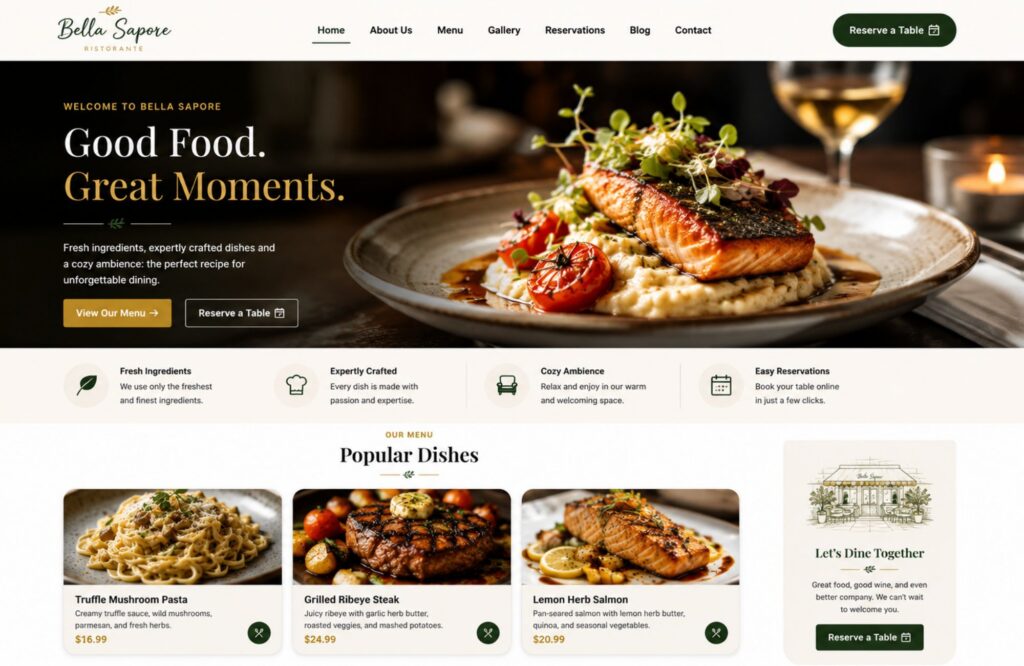
Web design for restaurants should help people choose what to eat, find the location, place an order, or reserve a table without extra steps. A strong restaurant website puts the menu, hours, phone number, directions, online ordering, and reservations where mobile visitors can reach them fast. It also gives search engines clear text and location details to understand.
The best restaurant website design is not the one with the most effects or bright colors. It is the one that removes doubt at each point in the dining decision. A customer should know what food you serve, what prices to expect, when you are open, where you are located, and what action to take next.
What Should Web Design for Restaurants Accomplish?
Web design for restaurants should turn a quick search into a clear next step. The website needs to help diners browse the menu, check prices, view high-quality photos, learn the hours, get directions, order takeout, or reserve a table. Each action should feel direct on a phone and easy to complete.
The Homepage Should Answer Five Questions
A restaurant homepage should answer five questions within the first screen or two:
- What type of food does the restaurant serve?
- Where is it located?
- When is it open?
- Can visitors order or make reservations?
- What makes the restaurant worth a visit?
A clear location, current hours, cuisine type, and two or three strong calls to action matter more than a long brand story at the top of the page. “View Menu,” “Order Online,” and “Reserve a Table” should look different from standard navigation links. On mobile, a sticky action bar can keep the phone, order, and reservation options within reach.
The site also needs pages for basic information that does not fit on the homepage. These may include an About page, contact details, private events, catering, gift cards, a photo gallery, reviews, and location pages. Cafes may need a page for seasonal drinks and loyalty offers. Fine-dining restaurants may need private dining details, dress guidance, and reservation policies. Quick-service restaurants may place more focus on online orders, pickup times, and real-time item availability.
WebHaus treats the restaurant website as part of business operations, not an online brochure. Its restaurant web design service connects menus, ordering tools, reservations, local SEO, analytics, and post-launch measurement to customer actions.
Web Design for Restaurants Needs a Mobile-First Menu
Web design for restaurants works better when the menu is readable text on the site, not only a PDF or image. An HTML menu adapts to smaller screens, gives diners faster access to prices and descriptions, and lets search engines process dish names, cuisine terms, dietary labels, and other menu details.
Text-Based Menus Give Diners Better Access
Google can index PDFs and other text-based files. For restaurant menus, HTML is usually more practical because it supports responsive layouts, semantic headings, internal links, structured data, accessibility, and faster updates. It also makes updates easier than replacing and relinking a file.
A useful menu presentation should include:
- Clear categories such as breakfast, lunch, dinner, drinks, and desserts
- Current prices
- Short descriptions that name key ingredients
- Labels for vegetarian, vegan, gluten-free, or spicy dishes
- Allergen information where the restaurant can state it accurately
- Availability notes for seasonal items or a restaurant special
- An order button near items that are sold online
Interactive filters can help customers browse dietary choices, but the labels must reflect the kitchen’s actual practices. A “gluten-free” filter should not suggest zero cross-contact risk unless the restaurant can support that claim. Make sure the complete menu remains available in accessible HTML and does not depend on filters, color, or scripts that keyboard and screen-reader users cannot operate.
Menu Rules Change for Larger Chains
Federal menu-labeling rules apply to restaurants and similar food businesses that are part of a chain with 20 or more locations, operate under the same name, and sell substantially the same menu items. Covered businesses must follow FDA calorie and nutrition disclosure rules for standard menu items. State and local requirements may add other duties, so multi-location operators should have legal or compliance staff review online menu content.
A good workflow assigns one person to update prices, sold-out items, specials, and holiday hours. The menu should show a review date in the content system, even when that date is not public. Regular updates reduce the risk of a customer arriving with the wrong price, item, or schedule in mind.
Web Design for Restaurants Should Keep Ordering Close to the Site
Web design for restaurants should make online ordering feel like part of the restaurant’s own site, even when a trusted platform handles checkout. Diners should see the same menu names, prices, branding, pickup details, and location choice from the first click through confirmation. Fewer surprises support more completed online orders.
Direct Ordering Needs a Clear Business Plan
A 2025 NCR Voyix consumer survey found that 58% of respondents preferred using a restaurant’s own website or app when placing delivery or carry-out orders. The finding supports a clear first-party ordering path, but it does not mean every restaurant needs a custom app.
An independent cafe or local takeout shop may get more value from a clear “Order Online” button linked to Toast, Square, ChowNow, Clover, or another platform. A larger brand with strong repeat sales may benefit from a first-party app, loyalty system, and saved preferences.
Compare ordering options across the full operating cost:
| Ordering Choice | Main Benefit | Main Trade-Off |
| Third-party marketplace | Existing customer reach | Commissions, less customer data, competing listings |
| Branded platform page | Faster setup and familiar checkout | Limited design control and possible redirects |
| Embedded ordering widget | Smoother path from the website | Can add scripts and slow the page |
| Custom ordering system | Full control over flow and data | Higher build, security, and support cost |
Checkout Must Be Secure and Measurable
PCI DSS applies to entities that store, process, or transmit account data and to systems that could affect the security of that data. PCI DSS 4.0.1 requirements 6.4.3 and 11.6.1 became effective on March 31, 2025 and address payment-page script authorization, integrity, and tamper detection. A restaurant should use a qualified payment provider and avoid collecting card details through a basic website form.
Track menu views, order starts, completed purchases, average order value, coupon use, failed payments, and device type. Google Analytics 4 supports recommended ecommerce events for sales reporting. These numbers show where customers stop and whether a restaurant’s own site produces useful sales, not just visits.
Web Design for Restaurants Should Make Reservations Easy
Web design for restaurants should let a customer check availability and book a table with little effort. The main reservation button should appear on the homepage, menu page, contact page, and location pages. The booking flow should explain party size, date, time, policies, and confirmation without sending diners through confusing screens.
Reservation Forms Need Only Useful Fields
A standard reservation flow usually needs:
- Location, when the business has more than one
- Date and available time
- Party size
- Guest name
- Phone number or email
- Optional accessibility or seating request
- Clear confirmation
Do not request a full address, birth date, or long comment unless the operation truly needs it. Each extra field creates more work on a phone. The form should also explain what happens next. A successful booking needs an on-screen message and an email or text confirmation. When a request is not instantly confirmed, label it as a request so the guest does not assume the table is booked.
A direct booking widget can reduce friction because the customer can stay on the restaurant website. An external reservation page can also work when it loads fast, matches the brand, and returns the visitor to a clear confirmation. Test the full flow on iPhone and Android devices, including a sold-out time, a large party, and a same-day booking.
Different Restaurants Need Different Booking Rules
A small cafe may not need reservations at all. It may need a waitlist, event signup, or catering inquiry form instead. A fine-dining room may need deposits, cancellation terms, dress guidance, experience selection, or a time limit for each table. A venue with private events should use a separate lead form for date, guest count, budget range, food needs, and contact details.
Prominent buttons do not help when the booking system is out of sync with real capacity. The restaurant team needs a process for blocked dates, holidays, patio availability, event nights, and last seating times. Website and reservation settings should match what staff can deliver.
Web Design for Restaurants Must Support Local SEO
Web design for restaurants must give Google and diners consistent location information. Each restaurant location needs its own page with the full address, phone number, hours, cuisine, menu, ordering link, reservation option, directions, photos, and nearby landmarks. Local SEO works best when the website and Google Business Profile match.
Local Search Depends on Clear Business Details
Google says local results are mainly based on relevance, distance, and prominence. Restaurants cannot control a searcher’s distance, but they can improve relevance and prominence with complete business information, useful location pages, reviews, links, and content that matches how people search.
A location page can support searches such as “Italian restaurant near me” without awkward keyword repetition. A seafood restaurant in Newtown, Connecticut, for example, can describe its cuisine, lunch or dinner service, private events, parking, nearby areas, and popular menu items. That gives search engines more context than a homepage that only shows the brand name.
Embed Google Maps near the address and include a normal directions link. Google’s Maps Embed API can place an interactive map on a page, though the page should still show the written address because an embedded map alone is not enough for every visitor.
Structured Data Clarifies Restaurant Details
Restaurant and LocalBusiness structured data can describe hours, address, telephone, price range, menu URL, cuisine, and other business facts in a standard format. Google states that structured data helps its systems understand page content and can support business information in Search and Maps. It does not promise higher rankings, and markup must match visible page content.
For a multi-location business, do not copy one page and change only the city. Each page should show the correct menu, hours, photos, services, reservation link, and local details. Keep the same name, address, and phone format across the website, Google Business Profile, reservation platform, ordering app, and major listings.
Fast, Accessible Restaurant Websites Protect Customer Actions
A fast and accessible restaurant website helps more visitors read the menu, tap an order button, and finish a reservation on a phone. Current performance targets focus on loading, response time, and visual stability. Accessibility work supports people with disabilities and also makes controls clearer for diners in busy, bright, or low-connectivity settings.
Current Performance Targets Are Measurable
As of July 31, 2026, Google’s Core Web Vitals guidance defines a good Largest Contentful Paint as 2.5 seconds or less, Interaction to Next Paint as 200 milliseconds or less, and Cumulative Layout Shift as 0.1 or less. These measurements should be reviewed at the 75th percentile of real visits, split across mobile and desktop.
WebHaus lists 1.8 seconds as its typical LCP at launch. Its restaurant website service also includes analytics, conversion tracking, and a 90-day post-launch review. This launch benchmark is faster than Google’s “good” LCP threshold of 2.5 seconds or less.
A 2017 web.dev case study provides a useful, though dated, mobile-performance example. Ele.me reported that 99% of its users ordered on mobile. After rebuilding its multi-page application as a progressive web app, average loading time fell 6.35% across all pages and 11.6% across pre-cached pages. The example illustrates mobile-performance principles but should not be treated as current restaurant-industry data.
Mobile Design Needs More Than a Responsive Template
Google uses the mobile version of a site for indexing and ranking. Menu text, structured data, images, titles, and links should remain available on mobile rather than hiding key content behind controls that visitors may miss.
Use readable type, strong contrast, clear form labels, keyboard access, image text alternatives, and visible focus states. WCAG 2.2 sets a Level AA minimum target size of 24 by 24 CSS pixels, with limited exceptions; larger order and reservation buttons are easier to tap. The U.S. Department of Justice also states that businesses open to the public should make web content accessible to people with disabilities under the ADA.
High-Quality Photos Should Support the Menu, Not Slow It Down
High-quality photos can show food, ambiance, seating, events, and the style of the restaurant before a customer visits. The best images sit close to the menu items, reservation prompts, or order buttons they support. A gallery can add trust and inspiration, but large image files should not delay access to basic information.
Real Photos Build a Clearer Expectation
Use original images of signature dishes, the dining room, exterior sign, staff, patio, bar, and private-event setup. A customer deciding where to eat wants proof that the space and food match the brand. Verified reviews, local awards, and accurate press mentions can add trust near these images. Stock photos can create a false expectation, especially when the dish, portion, or location does not exist at the restaurant.
Visual hierarchy should guide attention from the food to the next action. Photo selection should follow the sales path. A takeout restaurant may showcase best-selling menu items and packaging. A cafe may focus on coffee, pastries, workspace, and outdoor seating. A fine-dining restaurant may show plating, service, ambiance, wine, and special events. A family restaurant may feature shareable dishes, booth seating, and group tables.
Avoid image sliders that hide key content or move before a visitor can read. One strong hero image usually works better than a heavy rotating collection. Add short alt text that describes what is visible, such as “grilled salmon with roasted vegetables at [Restaurant Name].” Do not stuff the location or menu keyword into every image description.
Image Performance Needs a Publishing Rule
Set a standard for dimensions, compression, file type, crop, and naming before photos reach the website. Choose WebP, AVIF, or another tested format when it gives you a smaller file without making the food look dull. Use clear file names such as grilled-salmon-restaurant-name.webp. Load the main food image promptly, then delay below-the-fold gallery images until the visitor scrolls.
The counterintuitive lesson is that more photos do not always create more sales. Ten large images above the menu can push order buttons down the page and make the site feel slower. Use enough images to create confidence, then keep the main action visible. A short video can show ambiance, chef preparation, or private events, but it should be optional, muted at first, and compressed for mobile.
Website Ownership and Maintenance Matter After Launch
A restaurant website needs clear ownership, named update duties, backups, security checks, and support after launch. Menus, prices, specials, hours, reservation rules, staff pages, and events change often. A site can lose customer confidence quickly when its public details do not match what the restaurant currently offers.
The Restaurant Should Control Its Main Accounts
Before signing a web design agreement, confirm who owns and controls:
- The domain name
- WordPress administrator access
- Hosting access
- Website files and database
- Written content and licensed images
- Google Business Profile
- Google Analytics and Search Console
- Ordering and reservation accounts
- Customer and loyalty data
A customizable template or closed platform may look free or simple at first. The real question is whether the restaurant can export its content, move providers, keep its domain, and retain its customer data. WordPress can provide strong ownership and room to customize, but it still needs updates and technical care.
WebHaus states that clients own their domain, content, and data, with analytics and a 90-day post-launch review included in its process. Its website maintenance plans cover software updates, off-site backups, uptime checks, security monitoring, performance reviews, and content updates.
A Simple Update Calendar Prevents Stale Information
Assign one manager to send website updates and one person or vendor to publish them. Use a weekly check for sold-out items and specials, a monthly check for prices and links, and a quarterly review for photos, SEO pages, accessibility, analytics, and conversion flow.
Test ordering and reservations after platform updates. Submit a real test order with a low-cost item or test mode, and book a table from a phone. Confirm emails, texts, taxes, fees, pickup times, cancellation terms, and analytics events. Keeping content current is not a design task alone. It is part of customer service.
How Much Does Web Design for Restaurants Cost?
Web design for restaurants can range from a low-cost template to a custom website with menus, ordering, reservations, local SEO, copy, photography support, analytics, hosting, and maintenance. The right budget depends on how much revenue and customer activity the site needs to handle, not only the number of pages.
| Website Approach | Typical Fit | Main Cost Drivers |
| DIY restaurant website templates | New cafe or small operation with basic information | Platform plan, premium apps, owner time, domain |
| Customized template | Restaurant with a clear brand and standard tools | Design work, menu setup, integrations, copy |
| Custom WordPress website | Growth-focused independent or multi-location restaurant | Strategy, custom design, SEO, development, tracking |
| Custom ordering or loyalty build | High-volume brand with special workflows | APIs, payments, customer accounts, testing, support |
WebHaus currently uses $2,000 to $15,000 as a broad agency planning range for a professionally designed restaurant website. Its restaurant package starts at $199 per month for 12 months at 0% interest, with the final price based on features and scope. WebHaus states that restaurant projects typically take four to eight weeks. These are company pricing terms and planning figures, not fixed market rules.
Review quotes line by line. Ask whether they include menu entry, copywriting, image work, ordering and reservation integrations, local SEO, structured data, accessibility testing, performance work, analytics, hosting, plugin fees, maintenance, and staff training. The small business website cost guide explains how one-time and monthly costs fit together.
Restaurant website templates can be useful when the business has more time than budget. Custom web design makes more sense when the restaurant needs distinct branding, location pages, direct sales tracking, complex menus, private-event leads, or integrations that customizable templates cannot handle cleanly.
A Restaurant Website Launch Checklist Prevents Costly Mistakes
A restaurant website should not go live after a desktop design review alone. The launch process needs real mobile tests, correct business details, working orders and reservations, search setup, analytics, accessibility checks, and a clear update owner. The final test should follow the same path a diner takes from Google to confirmation.
Test the Customer Journey Before Launch
Complete these checks on at least one iPhone, one Android phone, and a desktop browser:
- Search the restaurant name and a relevant local phrase.
- Open the homepage and find hours, location, menu, order, and reservation actions.
- Read the menu without zooming or downloading a file.
- Apply a dietary filter and confirm the result is accurate.
- Place a test order through checkout.
- Make, change, and cancel a test reservation.
- Tap the phone number and directions link.
- Submit private dining or catering forms.
- Check email and text confirmations.
- Review the page with a keyboard and screen reader test.
Validate Restaurant or LocalBusiness structured data with Google’s Rich Results Test. Check Search Console after launch to confirm that key pages can be crawled and indexed. Google notes that recrawling and reindexing can take several days after publication.
Track the actions tied to business value: menu views, calls, directions, order starts, purchases, reservation starts, completed bookings, gift card sales, loyalty signups, event inquiries, and form errors. Compare mobile and desktop results. A high-traffic page with few actions may need a clearer button, shorter form, better menu presentation, or stronger trust signals.
The last step is an operations handoff. Staff should know who updates the menu, who handles failed orders, who changes holiday hours, who reviews form leads, and who contacts the web team when an app or integration breaks.
Conclusion
A strong restaurant website gives diners fast access to the menu, prices, hours, location, ordering, and reservations. It also gives the business control over content, tracking, and updates. Focus on mobile usability, current information, speed, safe payments, local SEO, accessibility, and ownership. These choices turn more visits into orders, bookings, and repeat guests.
At WebHaus, we build restaurant websites around search visibility, online orders, reservations, and long-term ownership. We help with custom WordPress design, menu pages, ordering and booking integrations, local SEO, performance, analytics, and ongoing support. Contact us to discuss the restaurant website features, timeline, and budget that fit your business.
FAQs
What should a restaurant website include?
A restaurant website should include an HTML menu, current prices, hours, full location details, phone number, directions, food photos, online ordering, and reservations when offered. It should also show reviews, accessibility information, dietary notes, events, gift cards, and private dining details when they help customers decide. Keep the main actions visible on mobile.
How much does a restaurant website cost?
Restaurant website cost often ranges from a basic template subscription to several thousand dollars for custom restaurant website design. WebHaus currently uses $2,000 to $15,000 as a broad agency planning range and offers restaurant projects starting at $199 per month for 12 months at 0% interest. Ordering systems, custom integrations, multiple locations, SEO, content, photography, hosting, and maintenance can raise the final price.
How do I create a website for my restaurant?
Creating a restaurant website starts with the customer actions the site must support, such as viewing the menu, ordering, booking, calling, and getting directions. Next, choose a platform, prepare brand assets and high-quality photos, build the pages, connect the ordering and reservation tools, add local SEO, and test every path on mobile. Launch only after staff know how menu and hour updates will be handled.
Do restaurants need their own websites?
Restaurants need their own websites when they want control over their brand, menu, search presence, customer journey, and direct sales channels. Social pages, maps, review sites, and delivery apps can help discovery, but those platforms control the layout, rules, fees, and competing listings. A restaurant’s own site gives the business a stable center for accurate information, online orders, reservations, events, and loyal customers.

Thomas Guardado is a seasoned digital marketing expert with over a decade of experience helping businesses grow their online presence and generate leads. He specializes in search engine optimization (SEO), paid advertising, and conversion-focused website strategies, combining data-driven insights with proven marketing techniques.
Throughout his career, Thomas has worked with a wide range of businesses, developing and executing strategies that improve visibility, increase traffic, and drive measurable results. Known for his practical approach and deep understanding of digital trends, he focuses on building sustainable growth for the brands he supports.